 See it on dometrain
 See it on dometrain
 See it on dometrain
 See it on Amazon

Competing Consumers Pattern: The Underrated Key to handling more load

⏱ 22 min read
This article first appeared on systemdesign.one Newsletter.
API consumers depend on API contracts^1, and even the slightest change can break dozens of integrations. Rename a field, change a response format, change an endpoint entirely, and suddenly someone’s production system might stop working correctly. Systems grow, business requirements change all the time, and security or regulatory updates force adjustments that need to be communicated clearly.
That’s where versioning comes in. Versioning provides a structured approach to evolving APIs without leaving our API consumers behind. It sets the guidelines for how changes are introduced, how extensive those changes are, and how consumers can transition to new versions at their own pace.
But here’s the catch - just adding a version number in the URL doesn’t automatically prevent all the problems that might appear.
I’ve personally seen numerous APIs across different domains that expose a /v1/ in their URLs. Not that it’s a terrible idea, but years later, they are displaying the same version even though the API has changed a lot.
I find it hard to believe that nothing has changed in an API contract since they were first created. We often add new data, change property names, modify their types, remove fields, and so on. If so, why add a version at all?
The truth is, many APIs end up with “v1” in the URL forever because the same organization or teams control the consumer apps**.**
When the API owners and the API consumers are developed by different teams working at the same company, version upgrades are “just” code changes. Teams can synchronize deployments, push breaking changes, and update consumers without much risk of breaking changes.
However, the scenario changes completely when the API is exposed publicly, and you don’t own and control the consumers. Suddenly, you cannot just break compatibility.
You may be constrained by:
…all of which force you to design carefully and communicate transparently.
You don’t want to spend nights answering angry support calls because someone’s app broke after you changed an endpoint. That pressure alone is often enough to influence how you version.
It’s helpful to think about APIs as contracts. The contract describes the shape of the data, the form of the endpoints, and the behavior of the API. The client and the provider both agree to this contract.
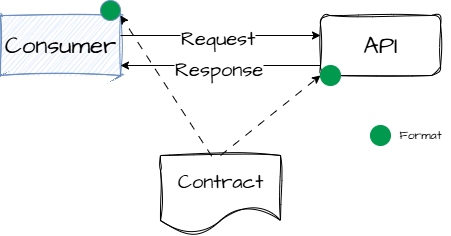
However, contracts aren’t fixed forever - they evolve. A new field is added, a bug is fixed, or sometimes, a breaking change sneaks in. Versioning is our way of saying:
The idea of a ‘contract’ helps both parties—the consumer and the API—understand each other. This way, they can communicate effectively.
When an API evolves, we usually have three paths forward:
This means creating something like /api/v2/orders while keeping /api/v1/orders around. Current users can keep using the old version as is. They will switch only when they want the new features. This approach is safe and straightforward for clients, but it creates a lot of work for API owners. They now need to maintain several versions at the same time. This means fixing bugs, applying security updates, or implementing features for all supported versions. Over time, this can get very expensive and slow down future improvements.
In this approach, the API changes in a way that doesn’t break existing clients. Typically, this means additive changes, such as new fields in a response, new optional parameters, or new endpoints. Consumers don’t need to update anything, since everything they used before still works the same way. The rules are tight. Even a tiny change, such as changing givenName to firstName, can cause compatibility issues. This happens because current clients might rely on the original name. This strategy works well for gradual growth but can be limiting when bigger design shifts are needed.
In this scenario, the API makes changes that require and force every client to upgrade.
At first glance, this sounds like the worst option—and often it is, because it forces all consumers to adapt quickly. But sometimes it’s unavoidable. For example, new rules might need a different data model. A serious security flaw could require significant changes. Also, the original API design may have issues that can't be fixed easily.
In reality, we need a mix of all three, depending on the type and impact of changes. And that’s where rules and versioning strategies come in.
Additive vs. Explicit Versioning
When you make additive changes only, your API evolves without incrementing its version. You add new fields, parameters, or endpoints, but never remove or rename anything. Additive changes are easy for consumers. They don’t have to change their integrations—but they force API designers to carry legacy choices forever.
By contrast, explicit versioning acknowledges when a change breaks compatibility. You create a new version using a URL, header, or parameter. This gives clients a clear boundary. They can see old behavior in one version and new behavior in another. Explicit versioning may require more maintenance, but it allows for bigger, cleaner design changes when needed.
| Aspect | Additive Versioning | Explicit Versioning |
|---|---|---|
| What it is | Evolve the API only by adding fields, parameters, or endpoints | Introduce a new API version when breaking changes are needed |
| Backward compatibility | Fully preserved (no removals or renames) | Not preserved between versions |
| Impact on consumers | Very low — integrations continue to work without changes | Consumers must choose and migrate to the new version |
| Design flexibility | Limited — must keep all legacy choices forever | High — allows major redesigns or cleanup |
| Maintenance overhead | Lower initially, but grows with legacy baggage | Higher — must maintain multiple API versions |
| Ideal for | Stable APIs with infrequent changes | APIs that evolve rapidly or require periodic breaking improvements |
| Version indicators | None (single evolving API) | URL path (/v2), header, or query parameter |
Let’s walk through the different approaches to versioning an API, their benefits, and their drawbacks.
This is the most common approach:
https://coolapi.com/api/v1/orders
Path-based versioning solves the problem of clarity and visibility. Both developers and clients can easily identify which version they are using because it is visible upfront, in the path. This makes it easier for new consumers to follow documentation and quicker for developers to configure routing logic.
However, this clarity comes at the cost of stability. URIs change with every major version, which means clients may break unless the provider maintains multiple versions at the same time. For API owners, that means patching, monitoring, and duplicating logic across /v1, /v2, and beyond.
Pros:
Cons:
It seems easy enough, but here’s the challenge:

If we correlate that with what Tim Berners-Lee said in 1998, that” Cool URIs don’t change,” we might have no reason to version in the URL. Not in the path anyway.
Let’s take a step back for a moment. A REST API is designed to work with representations of resources. For example, imagine your system has a domain with entities such as Orders or Cookies. You will have endpoints that manage them, allowing you to add, delete, or edit these items as needed. Once the API evolves, the new version of the API will change how the resource is represented. It can have new fields, or the structure may be slightly different, but the core concept will be the same. An Order will be an Order object, whether you’re looking at version 1 or version n of the API. It doesn’t turn into a Cookie object because you moved from v1 to v2.
Best practice: If you adopt path-based versioning, always keep older versions alive for a transition period. Announce clear deprecation timelines and provide migration guides. Use shared libraries for common logic so that bug fixes don’t need to be copied everywhere.
HTTP itself provides mechanisms for communicating versioning and deprecation. Two of the most useful are the Sunset header and 3xx redirects:
Sunset: Wed, 01 Jul 2026 00:00:00 GMT
This communicates to consumers that the current version is scheduled to be retired on July 1, 2026. Combined with other headers like Deprecation: true, it gives clients time to plan migration instead of being caught off guard.
/api/v1/orders with a 301 Status code and a Location header that specifies where the resource can be found.301 Moved Permanently
Location: /api/v2/ordersThis helps consumers who aren’t ready to update their code right away. It also guides them toward the newer version. Redirects work very well when endpoints haven’t changed much—otherwise, clients may still need code changes.
Instead of including the version in the path, the base URL is kept stable and the version is included as a parameter:
https://coolapi.com/api/orders?api-version=1.2.3
****This approach solves the problem of flexibility at the resource level. Developers can version specific endpoints or even individual resources without changing the overall API structure. Clients don’t need to update/store base URLs, and multiple versions can coexist on the same path.
Routers typically rely on paths, not query strings, so you’ll need custom logic in your gateway or application to handle version dispatch. Documentation must also be precise; otherwise, developers may forget to include the query parameter and end up confused.
Another important consideration is caching. To prevent serving the wrong version, ensure that CDNs and proxies cache ?version=1 and ?version=2 separately. This is because many treat query strings as part of the cache key. This also brings risks. Caches might not normalize parameters the same way, like ?version=2 and ?version=02. This can lead to cache pollution and lower hit rates. In poorly set up systems, some intermediaries might ignore query parameters. This can lead to clients getting the wrong version of a response.
Pros:
Cons:
Best practice: If you choose query parameters, configure your CDN or cache always to include them in the cache key. Document the parameter in each example call. Also, check its presence on the server side. This way, clients get clear error messages instead of silent issues. Normalize query strings where possible to avoid duplicate cache entries.
This works well when you want resource-level control, but it can complicate your codebase and caching strategy.
Here, the version is part of the request or response body itself:
{
  "version": "v1",
  "data": {
    "id": 123,
    "status": "shipped"
  }
}
Payload versioning facilitates the management of long-lived data in asynchronous systems. In event-driven or queue-based architectures, payloads can be stored for later replay. Including the version in the message allows consumers to know which schema to use, even after a long time.
However, this approach mixes concerns. Versioning is now part of business data. Each consumer must manage multiple schemas. For REST APIs with short request/response lifecycles, this adds extra complexity.
Best practice: Use payload versioning only for asynchronous or event-driven systems. Treat messages as fixed facts and create schema registries. This helps consumers safely deserialize old formats. Don't use this for standard REST APIs unless you need messages that last beyond your endpoints.
Here, the URL stays clean, and the version is passed in the request headers:
GET /api/orders
api-version: 2
Another approach is to version APIs through the Accept header. Instead of changing the URL or adding query parameters, the client specifies the resource version by requesting a specific media type. This is known as Media Type Versioning. For example, the client might use an Accept header value. The API will then respond with the resource formatted according to version 2 of the contract.
Accept: application/vnd.example+json;api-version=2
Accept: application/vnd.github.v2+json
Header-based versioning lets clients upgrade to new API versions at their own pace. This means they don’t have to rewrite or disrupt their integrations.
But there is a catch. Because version information is hidden in headers, it is less visible in logs or browser address bars. s. Debugging is more difficult if logging and tracing systems aren't set to record these headers. Proxies or middleware may even strip out unknown headers if not set up correctly.
Pros:
Cons:
Version isn’t visible in the URL (harder for debugging, logging, and caching).
Some proxies or middlewares might strip or block custom headers.
Caching introduces some challenges because the version is shown in the Accept header. Caches (such as CDNs, reverse proxies, and browsers) require the correct setup to use this header when storing and delivering responses.
To solve this, add a Vary: Accept header. This tells caches that different Accept values lead to different responses. As a best practice, we should always include a Vary header in our responses (e.g., Vary: api-version or Vary: Accept) to prevent caches from mixing responses across different versions.
Adopting this option may seem complex, but it’s the cleanest and most sustainable choice long-term. Header-based versioning keeps your URLs stable. For example, the/orders endpoint will always point to the same resource, no matter the version. Instead of using different endpoints like /v1/orders or /v2/orders, versioning becomes part of the resource's representation. This fits well with HTTP and REST design principles.
This method also helps your API adapt to future changes. You can update representations without breaking links. It maintains consistency across endpoints and uses HTTP's content negotiation tools, such as Accept and Content-Type. This reduces fragmentation, keeps your API smaller, and offers a clearer contract for users.
The initial setup may require more effort. Teams need to configure caching properly with Vary: Accept and adjust their tools. However, the long-term benefits include a cleaner, more maintainable API that avoids piling up technical debt with each new version.
Now that we've covered versioning types, let's explore our options for versioning parameter format.
Semantic Versioning (SemVer) is a system that uses the format MAJOR.MINOR.PATCH. This helps illustrate the changes included in a release.
Example: 2.4.1 → second major release, fourth minor, first patch.
This gives consumers expectations: a jump from 1.9 to 2.0 is a big deal, but a rise from 2.4 to 2.5 should be considered safe.
CalVer is a versioning convention that uses dates instead of semantic numbers. Sometimes it is based on your project's release calendar.
Example: Ubuntu 24.04 - released in April 2024 (YY.MM format). Python 3.12.20231001 - could mean a release from October 1st, 2023 (YYYYMMDD format).
The version shows when the software was released. This helps us track freshness more easily than compatibility.
Hash versioning is a versioning scheme that uses hashes (like Git commit IDs) instead of numbers or dates. It allows us to reference a point in time for our software, hardware, or anything in between. Example: v-237a2b4f -could be the shortened Git commit hash where the build was cut.
The challenge with versioning is conveying a potentially large set of API changes into a single version label.
It’s one thing to talk theory, but let’s look at how a company like Stripe is designing its API.
Stripe uses a header-based versioning approach: clients send a Stripe-Version header to indicate which API version they want. When a new user first makes a request, Stripe “pins” that account to the latest available version at that time. All future API calls from that account use that version by default unless the client overrides it.
Stripe-Version: 2023-10-16Stripe also releases rolling versions^2, named by date, with most releases being backward-compatible. Only certain “major” or “release train” versions introduce breaking changes. Versions are named with dates (e.g. 2025-08-27.basil) rather than simple numeric “v1, v2” semantics
Why Stripe chose this approach — strengths & trade-offs
Strengths/rationale:
Stability for clients
Pinning an account to a version helps Stripe keep existing integrations safe during updates. Clients can upgrade when convenient. Stripe+1
Controlled breaking changes
Most changes are backward-compatible; breaking changes are introduced only at specific release points. This smooths the migration path. Stripe Docs+2Stripe Docs+2
Flexible overrides & experimentation
Clients can set the Stripe-Version header for each request. This allows them to test new versions without a full migration. Stripe+2Stripe Docs+2
Decouples API routing from versioning
Since the version is in the header, the URL doesn’t need to change. The path stays clean and meaningful.
In other words, Stripe turned versioning into a safe, consumer-driven choice. You decide when to upgrade, not Stripe. This aligns perfectly with the principle: don’t break your consumers without their consent.
Another interesting case is GitHub’s REST API. GitHub uses header-based versioning with calendar-date identifiers. The base URL remains fixed: https://api.github.com/. Clients specify the version they want via the custom header:
X-GitHub-Api-Version: 2022-11-28
Why this works well for them
/users/{username}, /repos/{owner}/{repo}) never changes. Versioning lives in headers, which keeps URIs clean and consistent with Tim Berners-Lee’s principle that “Cool URIs don’t change.”GitHub’s approach highlights another philosophy: instead of thinking in v1/v2 jumps, think of your API as incremental snapshots in time. Clients pin to a snapshot and move forward when ready.
There’s no strict rule for when to raise a version number. It depends on many factors. Consider the following guiding questions:
Be pragmatic. Don’t bump the version with every deployment. Only bump when the contract changes in a meaningful way.
Versioning isn’t just a design choice—it also needs operational support. Fortunately, there are plenty of tools that can help automate and manage the complexity:

Gateways act as the traffic managers for your APIs. They sit in front of your services, receive incoming requests, and decide how to route them. This makes it much easier to run multiple API versions in parallel.
v1, v2) and control access with IAM policies.Usage scenario: You can keep /v1/orders active while routing /v2/orders to a new backend service, then gradually phase out/v1 once consumers have migrated.
Good versioning isn’t just about routing traffic - it’s also about communicating and making the changes visible to consumers. Documentation frameworks make sure developers know which version they’re using and what has changed.:
Examples:
Example in practice: You might publish orders-v1.yaml and orders-v2.yaml side by side. Swagger UI then shows consumers exactly what fields changed between versions, instead of leaving them to guess.
Usage scenario: You might publish orders-v1.yaml and orders-v2.yaml side by side. Swagger UI then shows consumers exactly what fields changed between versions, instead of leaving them to guess.
Depending on your ecosystem, you might find a library that handles the plumbing for different API versions. This means you won't need to reinvent the wheel. These can be useful. They cut down on boilerplate code and ensure consistent versioning across your endpoints.
Examples:
/v1/orders), query strings (?api-version=1.0), or headers.Usage scenario: In ASP.NET Core, you can decorate a controller with [ApiVersion("1.0")] and [ApiVersion("2.0")], then route clients to the right version based on the api-version header
Tools don’t replace a good versioning strategy, but they make the work manageable at scale. Gateways manage routing and deprecation. Documentation frameworks provide clarity for users. Libraries ensure code consistency. Tools like Postman and Swagger UI show what’s changed.
There’s no single “best” way to version APIs. Each strategy exists because it solves a different problem. The key is matching the strategy to your context:
And when it comes to version labels:
In the end, choose the versioning strategy that surprises your consumers the least. If you ensure their stability and make migration paths clear, they’ll trust your API. That trust is more valuable than any technical detail.
Footnotes
^1 - API Contract - the formal agreement that defines how clients interact with an API—covering its endpoints, methods, request and response formats, and error handling—and breaking it means existing integrations may fail.
rolling versions^2 -

Hi! Welcome to my blog
.NET, messaging, and distributed systems - the trade-offs the docs leave out.
Form not loading? Subscribe here.