 See it on dometrain
 See it on dometrain
 See it on dometrain
 See it on Amazon
Load Shedding: Dropping Requests to Save Your System

⏱ 9 min read
A queue will buy you time, but it doesn't buy you throughput.
Putting a queue in front of a struggling service feels like a fix. The API stops timing out, the database stops falling, the error graph goes flatter. The pattern even has a reassuring name: Queue-Based Load Leveling. And it does what the name says. It levels load, but it doesn't reduce it.
That difference is invisible on the day you add the queue. It shows up weeks later, when the queue is deeper every morning than the morning before and nobody can say when it started.
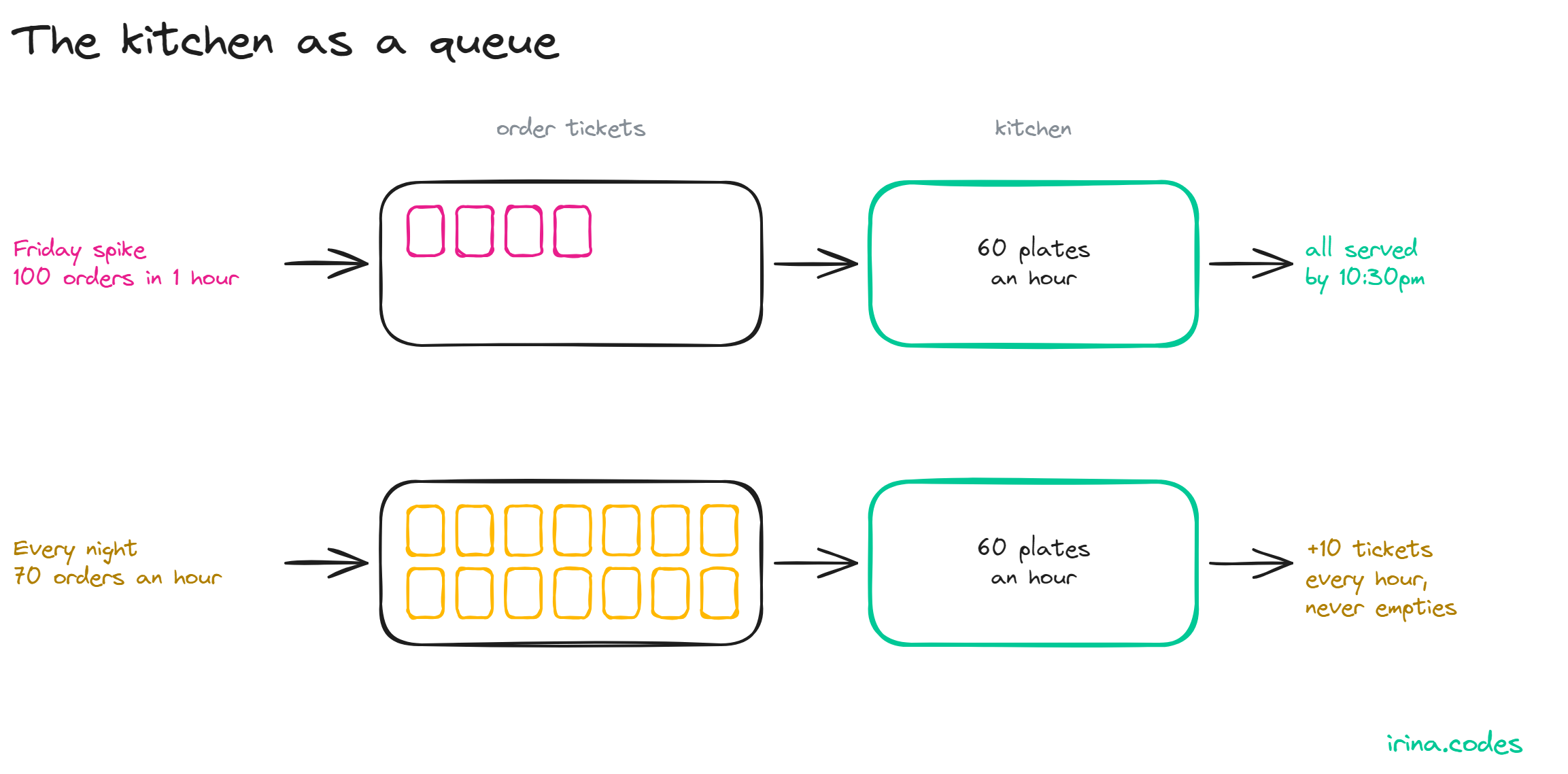
Picture a kitchen that cooks 60 dishes an hour. On Friday at 8pm, 100 orders come in within the hour. The order tickets pile up, the cooks keep their pace, and people wait a bit longer for their food. After 9pm, orders drop to 30 an hour. By half past ten the pile is gone, and the kitchen closes on time.
Now make it 70 orders an hour, all evening. The pile never goes away. By 11pm there are 40 orders waiting, each new order waits 40 minutes, and every hour adds ten more.
In both cases the pile did the same job: it held the orders until the cooks got to them. That's all a queue does. It stores extra work and hands it out later, like a shock absorber. The bump is still there, just spread out over time. If the consumers can't keep up on average, the queue turns extra work into waiting, and the wait keeps growing.
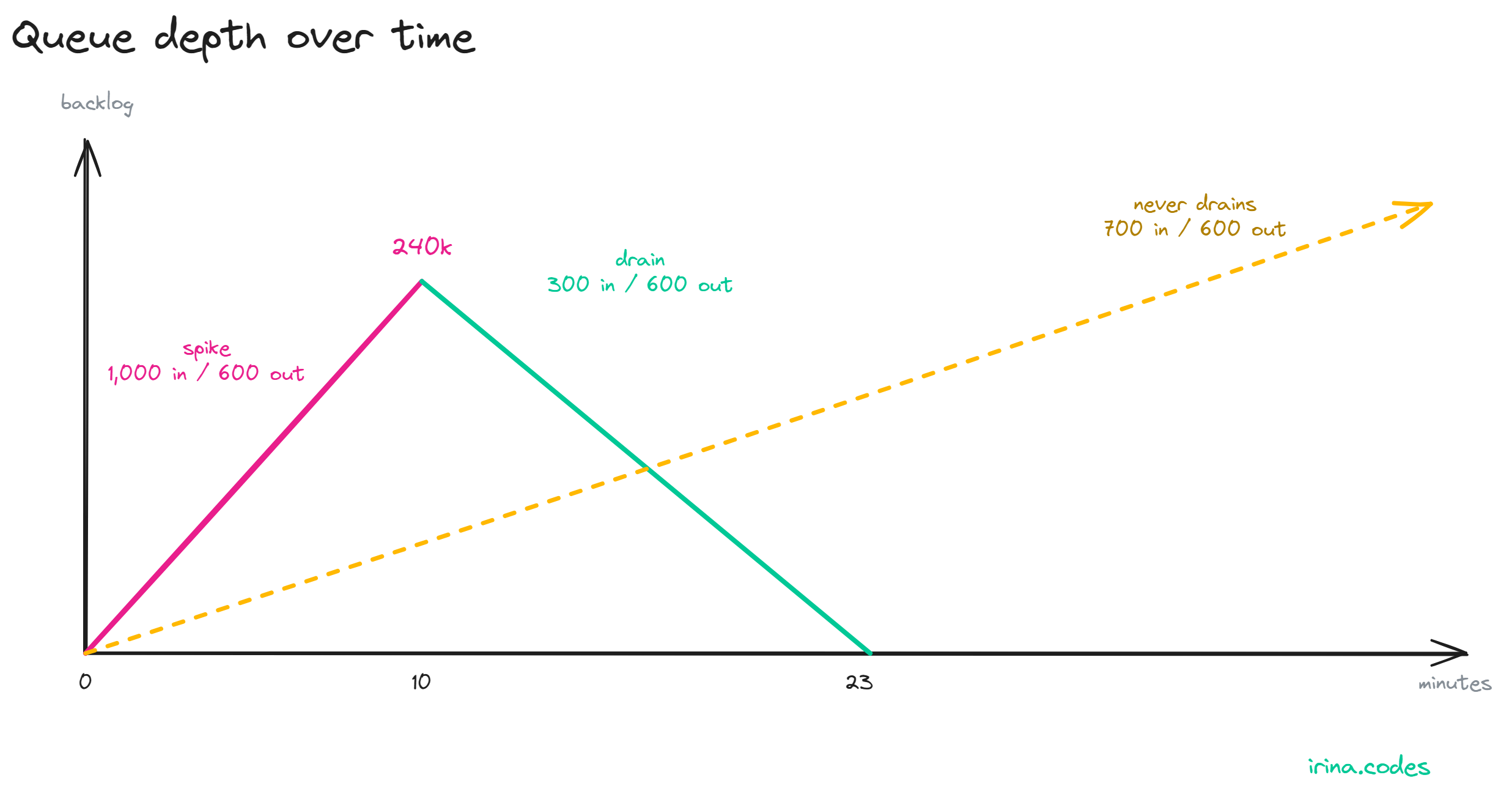
Let's put numbers on it, in messaging terms. Your consumers process 600 messages per second. A spike sends 1,000 messages per second for ten minutes, then traffic drops back to its normal 300.
During the spike:  1,000 in, 600 out, for 600 s
Backlog:           (1,000 - 600) x 600 = 240,000 messages
Last one in waits: 240,000 / 600 = 400 s (6 min 40 s)

After the spike:   300 in, 600 out -> drains at 300 msg/s
Drain time:        240,000 / 300 = 800 s (13 min 20 s)
A ten-minute spike costs you 23 minutes and 20 seconds of elevated latency. The drain is longer than the spike itself.
Look at what sets the drain speed: your headroom, meaning capacity minus normal traffic. With 300 messages per second of headroom, 240,000 messages take 13 minutes. If normal traffic were 550 instead of 300, the headroom drops to 50, and the same backlog takes 80 minutes to clear. If another spike lands before that, you start the next one with a head start in the wrong direction.
The usual argument for a queue is that you can size consumers for average load instead of peak load. That holds, and the catch is in the word average. For that hour, the average is (600,000 + 900,000) / 3,600, about 417 messages per second. That's comfortably under 600, so the queue does its job. But the average includes the spike, and your capacity still needs room above it to drain before the next one arrives.
Change one number. Traffic sits at 700 messages per second, steady, against the same 600.
That's 100 extra messages every second, 360,000 every hour. Each hour of traffic adds ten minutes to the wait. After a day you have 8.64 million messages and the newest one waits four hours. Nothing drains, because there is no quiet period to drain into.
A queue can't fix this. Neither can a bigger queue. I said it in the backpressure carousel and I stand by it: unbounded queues are delayed failures.
Let's take Azure Service Bus for example. It will eventually say no for you, since a queue at its size limit rejects sends with a QuotaExceeded error. That's the worst moment and the worst place to find out.
So watch the direction, not a fixed threshold. A depth of 50,000 during a sale can be fine. A depth that is higher at the end of every day than at the start is not.
Depending on what you are using you can also measure age directly: ServiceBusReceivedMessage.EnqueuedTime tells the consumer how long each message waited, and that number maps to what your users feel.
When the average is too high, you have two honest options. Add real capacity, or shed work at the producer before it enters the queue. I wrote about how to do the second one in Load Shedding: Dropping Requests to Save Your System. A 503 with Retry-After at the front door is kinder than a four-hour wait nobody told the caller about.
The obvious fix is to scale the consumers on queue depth: more instances reading from the same queue, each taking the next message, which is the Competing Consumers pattern. Azure Functions does this out of the box. With target-based scaling on a Service Bus trigger, the desired instance count is the queue length divided by maxConcurrentCalls, which defaults to 16.
Run our 240,000-message backlog through that. The formula asks for 15,000 instances. On the Flex Consumption plan, the default cap is 100 instances, so you get 100. That is 1,600 concurrent handlers - more on multi-core plans, where maxConcurrentCalls is multiplied by the number of cores. All of them are now hitting the database you put the queue in front of to protect.
The queue is empty again, and the overload moved one hop down. The number that matters is instances times per-instance concurrency, and it should come from what the downstream can take.
In Azure Functions that means capping both numbers. maxConcurrentCalls in host.json sets the handlers per instance, and --maximum-instance-count on Flex Consumption or functionAppScaleLimit on Consumption and Premium sets how many instances you get. Multiply the two before you trust either one.
Some messages age well. An invoice email sent 20 minutes late is fine. A "your driver is two minutes away" push notification sent 20 minutes late is noise.
Remember the 6 minutes 40 seconds from the spike example. If the data inside a message has a shelf life shorter than your worst drain, processing it late is wasted work. Worse, it slows down the drain for messages that still matter.
Many frameworks let you say specify the TimeToLive, same for Azure Service Bus.
var message = new ServiceBusMessage(payload)
{
    TimeToLive = TimeSpan.FromMinutes(5)
};
await sender.SendMessageAsync(message);
TTL on Standard and Premium is effectively forever, so nothing expires unless you ask. And expired messages are dropped unless the queue has DeadLetteringOnMessageExpiration enabled. Turn it on, then do something with what lands there: tell the user it's taking longer than usual, or send the work down a slower path, like an email instead of a push.
Expiry is also lazy. The broker might remove expired messages later, and a message already locked by a consumer still gets processed. Treat TTL as a cleanup rule. If you need a hard deadline, check it in the handler as well.
If the caller needs a synchronous answer, a queue doesn't help. The caller waits for the same backlog as everyone else. Six minutes and 40 seconds behind a spike is fine for an email. It's an eternity for an HTTP request someone is watching.
A queue also only levels load if the buffer survives. If the broker doesn't persist messages, a crash takes the backlog with it, and in our example that's 240,000 messages. And if your traffic is low and flat, a queue levels nothing. You get a broker to run and one more hop to debug.
Before adding a queue for load leveling, work out a few numbers:
TimeToLive on anything that goes stale, with dead-lettering on expiration.Then alert on the trend of depth and message age over hours, and decide ahead of time what the producer does when the queue is too deep. That decision is much easier to make on a Tuesday afternoon than during the incident.
A queue is a promise to do the work later. The pattern holds as long as "later" eventually arrives, which means the spike ends and your consumers have room to catch up. When the average is too high, the queue keeps collecting promises you can't keep.
PS: have you had a queue that never drained? Tell me what gave it away.
queue-based-load-leveling cloud-design-patterns azure-service-bus azure-functions backpressure dotnet

Hi! Welcome to my blog
.NET, messaging, and distributed systems - the trade-offs the docs leave out.
Form not loading? Subscribe here.